
What Is AWS Disaster Recovery?
Amazon Web Services (AWS) provides cloud-based disaster recovery (DR) solutions to protect applications, databases, and servers from data loss and downtime. It involves implementing recovery strategies that enable organizations to resume critical operations after a major disruption, such as a regional outage, cyberattack, accidental deletion, or infrastructure failure.
AWS supports several disaster recovery approaches, including backup and restore, pilot light, warm standby, and multi-Region active-active architectures. Organizations can use native AWS services or third-party tools to replicate data, restore resources, redirect traffic, and automate recovery processes.
Core DR strategies on AWS:
- Backup and restore: Low cost and low complexity; relies on periodic snapshots, AWS Backup, and Amazon S3 versioning. Best for non-critical systems.
- Pilot light: Keeps core data stores continuously active in the cloud while application servers remain off until needed.
- Warm standby: Runs a scaled-down, fully functional version of your active environment continuously, allowing rapid scaling during an outage.
- Multi-site active/active: Operates multiple active regions simultaneously to achieve near-zero RTO and RPO.
Key AWS disaster recovery services:
- AWS Backup: Centralizes and automates data protection across Amazon EBS, Amazon RDS, Amazon Aurora, and other services.
- AWS Elastic Disaster Recovery (AWS DRS): Minimizes downtime by continuously replicating block-level data from on-premises or cloud servers into a lightweight staging area in AWS. It achieves an RPO of seconds and an RTO of minutes.
- Cross-Region Replication (CRR): Uses features like Amazon S3 Replication and Aurora Global Databases for low-latency asynchronous data replication.
- Amazon Aurora Global Database: Replicates Aurora databases across AWS Regions with low latency, supporting managed switchover and failover for faster database recovery.
- Amazon DynamoDB Global Tables: Provides multi-Region, multi-active replication, allowing applications to read and write data in multiple AWS Regions for improved availability during regional outages.
Why AWS Workloads Need a Disaster Recovery Plan
Although AWS provides highly available cloud infrastructure, hosting applications in the cloud does not eliminate the risk of outages, data loss, or operational disruptions. AWS operates under a shared responsibility model in which the provider maintains the underlying cloud infrastructure, while customers are responsible for designing and implementing appropriate resilience and recovery measures for their workloads. Without a disaster recovery plan, even applications deployed across multiple Availability Zones can remain vulnerable to regional disruptions, data corruption, and security incidents.
A comprehensive AWS disaster recovery plan helps organizations address several critical risks:
- AWS Region and Availability Zone outages: Infrastructure failures, networking disruptions, or regional service interruptions can make applications unavailable. Cross-Region disaster recovery enables organizations to restore workloads in another geographic location when their primary environment becomes inaccessible.
- Ransomware and cyberattacks: Attackers may encrypt, delete, or corrupt production data and connected backups. Isolated recovery environments, protected backup copies, and point-in-time recovery capabilities help organizations restore workloads to a known-good state.
- Accidental deletion and configuration errors: Human mistakes, unexpected actions by AI agents, faulty deployments, and infrastructure misconfigurations can disrupt applications or destroy critical data. Recovery procedures enable organizations to restore affected resources and configurations.
- Business continuity and financial losses: Extended downtime can interrupt transactions, reduce employee productivity, damage customer trust, and cause revenue losses. Defined recovery procedures reduce uncertainty and support faster restoration of business-critical services.
- Regulatory and contractual requirements: Organizations subject to regulations or contractual availability commitments may need documented recovery procedures, data protection controls, and evidence of regular recovery testing.
- Complex application dependencies: Modern AWS workloads often depend on interconnected databases, storage services, APIs, and networking components. A disaster recovery plan establishes the order in which these systems must be restored to avoid incomplete or unsuccessful recovery.
Scope of an AWS Disaster: Where to Place Recovery Copies
The location of recovery copies determines which types of failures an AWS disaster recovery strategy can withstand. Copies stored across Availability Zones protect against localized infrastructure failures, while copies in separate AWS Regions provide protection against regional outages. Cross-account and cross-cloud copies add isolation from compromised credentials, accidental deletion, and provider-level disruptions.
| Recovery Strategy | Failures It Protects Against | AWS Services and Implementation | Key Limitations |
|---|---|---|---|
| Multi-AZ recovery within a single AWS Region: Distributes application components and data across physically separate Availability Zones within the same Region. Workloads can fail over to healthy resources when one Availability Zone becomes unavailable. | Individual data center failures, hardware outages, localized network disruptions, and Availability Zone outages. | Amazon RDS Multi-AZ, Elastic Load Balancing, EC2 Auto Scaling, and backups or infrastructure configurations that support recovery in another Availability Zone. | Does not protect against Region-wide outages. Replicated data may also contain logical corruption or accidental deletions. |
| Multi-Region recovery: Replicates backups, data, or standby infrastructure to a geographically separate AWS Region. Recovery can use backup-and-restore, pilot light, warm standby, or active-active architectures. | Region-wide infrastructure failures, extended regional service outages, and disasters affecting the primary geographic location. | AWS Backup cross-Region copies, Amazon S3 Cross-Region Replication, Amazon Aurora Global Database, and AWS Elastic Disaster Recovery. | Replication delays can cause data loss during failover. Additional infrastructure, data transfer, encryption, and application dependencies increase cost and complexity. |
| Cross-account backup isolation: Stores recovery copies in a dedicated AWS account with separate access permissions and administrative controls. Immutable backup configurations can provide additional protection against deletion or modification. | Compromised production credentials, accidental backup deletion, unauthorized administrative actions, and some ransomware attacks targeting production accounts. | AWS Backup cross-account copying, dedicated backup accounts, AWS Backup Vault Lock, and logically air-gapped vaults. | Does not independently protect against Region-wide failures when copies remain in the same Region. Shared identity or administrative dependencies can weaken isolation. |
| Cross-cloud or on-premises backup isolation: Maintains recovery copies outside AWS, using another cloud provider or an on-premises backup repository. Recovery infrastructure can operate independently of the primary AWS environment. | Severe AWS account compromise, provider-related disruptions, and failures affecting AWS-hosted recovery infrastructure. | Third-party backup and replication solutions, external object storage, and on-premises backup repositories. | Recovery outside AWS may require infrastructure conversion, compatible data formats, application reconfiguration, and additional network connectivity. |
Four Core AWS Disaster Recovery Strategies
Backup and Restore
Backup and restore is the simplest and generally least expensive AWS disaster recovery strategy. Organizations periodically create copies of application data, databases, and infrastructure configurations, storing them in a secure location such as another AWS Region. During a disaster, administrators restore the data and redeploy the necessary infrastructure to bring applications back online. Unlike other recovery strategies, backup and restore does not require a continuously running secondary application environment.
AWS services such as AWS Backup, Amazon EBS snapshots, Amazon RDS snapshots, and Amazon S3 support data protection and restoration. Organizations can use AWS CloudFormation or other infrastructure-as-code tools to automate resource provisioning and reduce recovery times. However, restoring databases, deploying servers, configuring networking, and validating applications can take considerable time, making this approach more suitable for workloads with recovery objectives measured in hours.
Pilot Light
The pilot light strategy maintains a minimal recovery environment in a secondary AWS Region while keeping the primary production environment fully operational. Essential components, such as replicated databases and data storage, remain available, but most application servers and supporting infrastructure are not actively running. When a disaster occurs, organizations provision or activate the remaining resources, scale the environment, and redirect application traffic to the recovery Region.
AWS services such as Amazon Aurora Global Database, Amazon S3 Replication, and AWS Elastic Disaster Recovery can support pilot light architectures for applicable workloads. Continuous replication helps keep recovery data synchronized with production, while infrastructure-as-code templates automate deployment of application components. Compared with backup and restore, pilot light can significantly reduce recovery times because critical data and foundational infrastructure are already available. However, recovery still depends on provisioning resources and making the application environment operational, with typical recovery objectives measured in tens of minutes.
Warm Standby
Warm standby maintains a fully functional but scaled-down version of the production environment in a separate AWS Region. Unlike pilot light, the secondary environment continuously runs application servers, databases, and other critical components, allowing it to process requests at reduced capacity. During a disaster, organizations redirect production traffic to the standby environment and increase its computing resources to handle the full workload.
Organizations can implement warm standby using services such as Amazon EC2 Auto Scaling, Elastic Load Balancing, Amazon Route 53, and supported cross-Region database replication technologies. Because the recovery environment is already running, warm standby can achieve recovery times measured in minutes. However, it requires greater ongoing infrastructure spending than pilot light and introduces additional operational responsibilities, including maintaining application consistency, monitoring replication, and ensuring the recovery Region has sufficient capacity and service quotas.
Multi-Site Active/Active
Multi-site active/active is the most advanced AWS disaster recovery strategy, with production workloads running simultaneously across two or more AWS Regions. Each Region actively handles user requests, allowing applications to continue operating when another Region becomes unavailable. Rather than activating a passive recovery environment, the architecture redistributes traffic among the remaining healthy Regions, potentially achieving near-zero recovery time for regional infrastructure failures.
AWS services such as Amazon Route 53, AWS Global Accelerator, Amazon DynamoDB global tables, and other supported multi-Region replication technologies can help implement active-active architectures. Organizations must coordinate data synchronization, manage conflicting writes, and ensure that the remaining Regions have sufficient capacity to handle increased traffic. Although this approach provides the strongest potential availability, it also introduces the highest infrastructure costs and operational complexity. Active-active replication does not replace backups, because accidental deletions, ransomware, and data corruption can propagate between Regions.
AWS Native Services for Disaster Recovery
The following table summarizes the primary AWS services used for disaster recovery. We describe each in more detail below.
| Service Description | AWS Integrations | How It Works | Limitations |
|---|---|---|---|
| AWS Backup: Centralized backup scheduling, retention, protection, and recovery. | EC2, EBS, RDS, DynamoDB, EFS, S3; AWS RAM for sharing logically air-gapped vaults. | Uses backup plans, tag-based assignments, copy rules, and restore testing. Vault Lock protects retention; logically air-gapped vaults add isolation and cross-account recovery. | Capabilities vary by resource and Region. Does not orchestrate complete application failover or restore every dependency. |
| AWS Elastic Disaster Recovery (DRS): Continuous server replication for recovery into AWS. | AWS Replication Agent, Amazon EC2, and recovery-Region staging resources. | Replicates server data at block level, then launches EC2 recovery instances. Supports recovery drills, point-in-time recovery, post-launch actions, and failback. | Actual recovery time depends on application dependencies. Traffic redirection, networking, identity, and application validation require coordination. |
| Amazon S3 Cross-Region Replication (CRR): Cross-Region protection for object data. | S3 buckets; S3 Replication Time Control. | Asynchronously copies eligible objects between Regions. Replication Time Control adds replication-time commitments and monitoring. | Replication is not instantaneous. Eligibility and configuration matter; independent backups or versioning remain important. |
| Amazon Aurora Global Database: Cross-Region database replication for low-RPO recovery. | Amazon Aurora clusters across AWS Regions. | Uses storage-based replication to maintain secondary Regions, with managed switchover or failover where supported. | Capabilities depend on configuration and engine version. Replication lag and application routing must be addressed. |
| Amazon DynamoDB Global Tables: Managed, multi-Region, multi-active database replication. | DynamoDB tables and regional application endpoints. | Replicates table changes across Regions so applications can read and write through healthy regional endpoints. | Consistency, write conflicts, and routing require consideration. Replication does not replace backups or point-in-time recovery. |
AWS Backup: Backup Plans, Vault Lock, and Logically Air-Gapped Vaults
AWS Backup is a data protection service that centralizes backup scheduling, retention, monitoring, and recovery across supported AWS resources. It supports services such as Amazon EC2, Amazon EBS, Amazon RDS, Amazon DynamoDB, Amazon EFS, and Amazon S3, although available backup capabilities vary by resource type. Organizations can create backup plans that define backup frequency, retention periods, lifecycle policies, and copy rules. Resource assignments can use tags, allowing new resources to receive backup protection automatically when they match predefined criteria.
AWS Backup Vault Lock protects recovery points against deletion and unauthorized retention changes. It supports governance and compliance modes, with compliance mode providing stronger immutability guarantees after the configured grace period expires. Logically air-gapped vaults provide an additional layer of protection by storing backups in AWS Backup service-owned accounts, applying compliance-mode Vault Lock automatically, and supporting cross-account recovery through AWS Resource Access Manager. They can also integrate with multi-party approval to support recovery when the vault-owning account is inaccessible.
For disaster recovery, organizations can configure cross-Region and cross-account backup copies, protected retention policies, and automated restore testing. However, AWS Backup primarily protects recoverable data and resource states; it does not independently orchestrate complete application failover or automatically restore every application dependency. Support for cross-Region copying, logically air-gapped vaults, and point-in-time recovery varies by resource type and AWS Region.
AWS Elastic Disaster Recovery (DRS)
AWS Elastic Disaster Recovery (AWS DRS) is a disaster recovery service that continuously replicates supported source servers into AWS, enabling organizations to recover applications running on physical, virtual, cloud, and supported AWS environments. It uses an AWS Replication Agent to perform block-level replication into a staging area within a designated recovery Region. This architecture maintains replicated data using relatively low-cost storage and minimal compute resources, rather than requiring a fully operational duplicate production environment.
During a disaster, AWS DRS converts replicated server data into bootable Amazon EC2 recovery instances and launches them using the most recent available state or a selected earlier point in time. Administrators can configure recovery instance settings, perform non-disruptive recovery drills, and use automated post-launch actions to help prepare recovered applications. AWS DRS also supports failback workflows, allowing workloads to return to their original environment after the disruption has been resolved.
AWS DRS is particularly useful for server-based applications, legacy workloads, and organizations migrating disaster recovery from on-premises infrastructure to AWS. It supports low RPOs through continuous replication and can launch recovery instances within minutes, although actual application recovery times depend on the workload and its dependencies. AWS DRS does not automatically redirect application traffic, so organizations must coordinate DNS changes, networking, identity services, and application validation as part of the broader recovery plan.
Data Replication Services: S3 Cross-Region Replication, Aurora Global Database, and DynamoDB Global Tables
AWS provides service-specific replication capabilities that help organizations maintain data copies across Regions without relying exclusively on periodic backups. These services are particularly valuable for applications requiring low RPOs and faster access to current data during regional failures. Unlike backup-based recovery, replication continually transfers changes from the primary environment to one or more secondary locations, reducing the amount of data that may be lost during a disruption.
Three important replication technologies include:
- Amazon S3 Cross-Region Replication (CRR): Automatically and asynchronously replicates eligible objects between S3 buckets in different AWS Regions. It helps protect object storage against regional disruptions, while S3 Replication Time Control provides replication time commitments and monitoring for eligible replication configurations.
- Amazon Aurora Global Database: Replicates Aurora database changes to secondary AWS Regions using dedicated storage-based replication infrastructure. It supports low-latency cross-Region replication and managed switchover or failover capabilities, depending on the database configuration and engine version.
- Amazon DynamoDB Global Tables: Provides fully managed, multi-Region, multi-active replication for DynamoDB tables. Applications can read and write data in multiple Regions, enabling workloads to continue operating through healthy regional endpoints when another Region becomes unavailable.
These services can substantially reduce the time required to make application data available in a recovery Region. However, replication introduces additional considerations around consistency, write conflicts, replication lag, and application routing. Replication also does not replace independent backups because accidental deletions, malicious modifications, and data corruption may propagate to replicated copies. Organizations should combine replication with versioning, point-in-time recovery, or immutable backups where supported.
4 Key Limitations of AWS Native Disaster Recovery Tools
AWS native disaster recovery technologies have several important limitations, which organizations need to be aware of as they plan their AWS DR strategy.
1. Does Not Support Whole-App Recovery
AWS provides multiple disaster recovery services, but recovery procedures vary significantly depending on the resource being protected. Restoring an Amazon EC2 instance, recovering an Amazon RDS database, rebuilding an Amazon EKS cluster, and activating a replicated S3 bucket involve different tools, configuration requirements, and operational steps.
While AWS Backup centralizes protection for supported resources, it does not automatically coordinate the complete recovery of complex applications involving interconnected compute, storage, networking, and identity components. In short, it brings back your data, not your entire application in the right dependency order.
AWS Backup provides automated restore testing for supported resource types, and AWS Elastic Disaster Recovery supports non-disruptive recovery drills. However, these capabilities do not necessarily validate complete application functionality, dependencies, network connectivity, or end-to-end business processes. Organizations may need other recovery solutions, and separate testing procedures to verify that entire applications can be recovered within their required RTOs and RPOs. This increases operational overhead and creates a risk that individual resources can be restored successfully while the broader application remains unavailable.
2. Backups Stored in the Same Cloud Provider as Production Data
Native AWS disaster recovery services typically store backup copies and replicated workloads within the AWS ecosystem. Although organizations can distribute recovery data across multiple AWS Regions and accounts, these copies remain dependent on AWS infrastructure, services, and identity management mechanisms. A widespread provider disruption, account compromise, or service-level failure could affect both production systems and recovery resources, particularly when they share administrative credentials or critical dependencies.
Cross-Region replication, cross-account backups, and logically air-gapped vaults reduce these risks by introducing additional geographic and administrative isolation. However, they do not eliminate dependence on a single cloud provider. Organizations with strict resilience requirements may need to maintain independent recovery copies in another cloud or on-premises environment. This approach adds complexity and costs but provides an alternative recovery location if AWS-based resources become inaccessible.
3. Limited Cross-Cloud and Hybrid Disaster Recovery Orchestration
Native AWS disaster recovery tools are primarily designed to protect and restore workloads within the AWS ecosystem. While services such as AWS Elastic Disaster Recovery can replicate supported on-premises and cloud-hosted servers into AWS, they do not provide a unified recovery platform for coordinating applications across AWS, Azure, Google Cloud, and on-premises infrastructure. Organizations operating hybrid or multi-cloud environments may need separate recovery tools, configurations, and procedures for each platform.
This fragmentation can complicate disaster recovery for applications that depend on resources distributed across multiple environments. For example, restoring an application hosted on AWS may also require recovering a database in another cloud, reestablishing network connectivity, and validating identity and access controls. Without centralized orchestration, administrators must coordinate these recovery steps manually or develop custom automation, potentially increasing recovery time and operational complexity.
4. Agent-Based Replication
AWS Elastic Disaster Recovery (AWS DRS) relies on replication agents installed on individual source servers to continuously replicate data to AWS. Unlike agentless backup approaches, this requires administrators to deploy, configure, monitor, and maintain software across every protected server. Each agent consumes CPU, memory, and network resources, potentially affecting application performance, particularly on resource-constrained or high-I/O workloads. Continuous replication also consumes network bandwidth, which can introduce additional infrastructure costs and affect replication performance.
Agent-based management introduces direct costs, such as additional resource consumption and infrastructure capacity, as well as indirect costs, including administrative effort, troubleshooting, and ongoing maintenance. While agent-based replication is specific to services such as AWS DRS rather than all native AWS backup tools, organizations should account for these costs when evaluating their overall disaster recovery strategy.
Third-Party Alternatives to AWS Disaster Recovery
The table below summarizes the key differences between these solutions. We explore each one in more detail below.
How we selected these solutions: We shortlisted third-party AWS disaster recovery solutions based on cross-account and cross-region recovery, immutable backup storage, AWS service coverage, and recovery automation.
| Category | Solution | Best For | Key Strengths | Things to Consider |
|---|---|---|---|---|
| Cloud disaster recovery | Dreeze | Recovering complete AWS applications | Dependency mapping, isolated immutable backups, ordered app recovery | Built for cloud apps, not on-prem servers |
| Hybrid backup platform | Veeam Backup for AWS | Teams already running Veeam | Policy-based snapshots, immutable backups, broad AWS coverage | High licensing costs, limited reporting |
| AWS-native backup and DR | N2W Backup & Recovery | AWS-centric teams needing orchestrated failover | 60-second backups, scheduled DR drills, cross-cloud recovery | GUI, stability and documentation gaps |
| SaaS cyber resilience | Druva | SaaS, air-gapped AWS backup without infrastructure | Agentless, isolated immutable backups, threat hunting | Complex setup, limited reporting customization |
1. Dreeze
Best for: Recovering complete AWS applications, with every resource they depend on
Strengths: Automatic dependency mapping, isolated immutable backups, ordered whole-application recovery
Things to consider: Built for public cloud applications; on-premises servers are out of scope
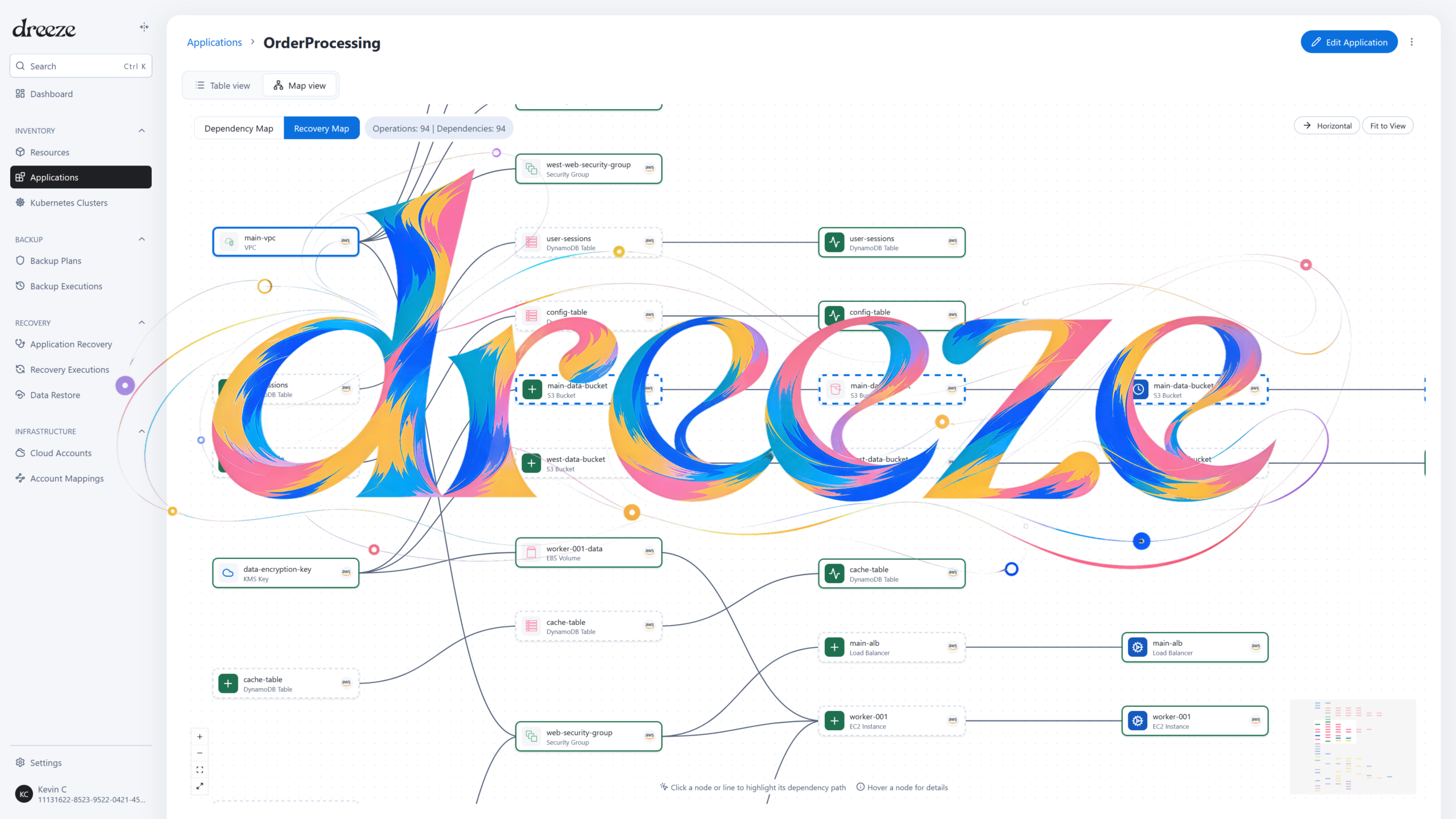
Dreeze is a cloud-native backup and recovery platform built to recover entire AWS applications. It maps how an application’s EC2 instances, containers, Lambda functions, databases, networking and identity fit together, protects all of it in an isolated vault, and rebuilds the application in the right order after a ransomware attack, an accidental deletion, a Region outage, or a bad change made by a person or an over-permissioned AI agent.
Where AWS Backup brings back resources one service at a time, Dreeze restores the application as a unit, so teams don’t have to rely on runbooks to work out what to restore and in which order. Dreeze also protects applications on Azure, and offers a free, read-only assessment of one or two applications.
Key features include:
- Automatic application dependency mapping: Discovers the resources behind each application, from Auto Scaling groups and load balancers to security groups and Secrets Manager entries, and keeps the map current as the environment changes. The mapping uses per-resource-type rules that reflect how AWS applications fit together in production.
- Isolated, immutable backups: Stores recovery copies in an isolated vault, out of reach of production accounts and credentials. Cross-Region replication is optional.
- Revival Automation: Rebuilds the full application in dependency order, including the VPCs, IAM roles, KMS keys and configuration it needs to run, along with its volumes and databases.
- Recovery testing: Rebuilds applications in an isolated environment on demand, so teams can prove recoverability before an incident.
Source: Dreeze
2. Veeam Backup for AWS

Best for: Teams already running Veeam that want AWS in the same console
Strengths: Policy-based snapshots, immutable backups, broad AWS service coverage
Things to consider: Users report high licensing costs and limited reporting
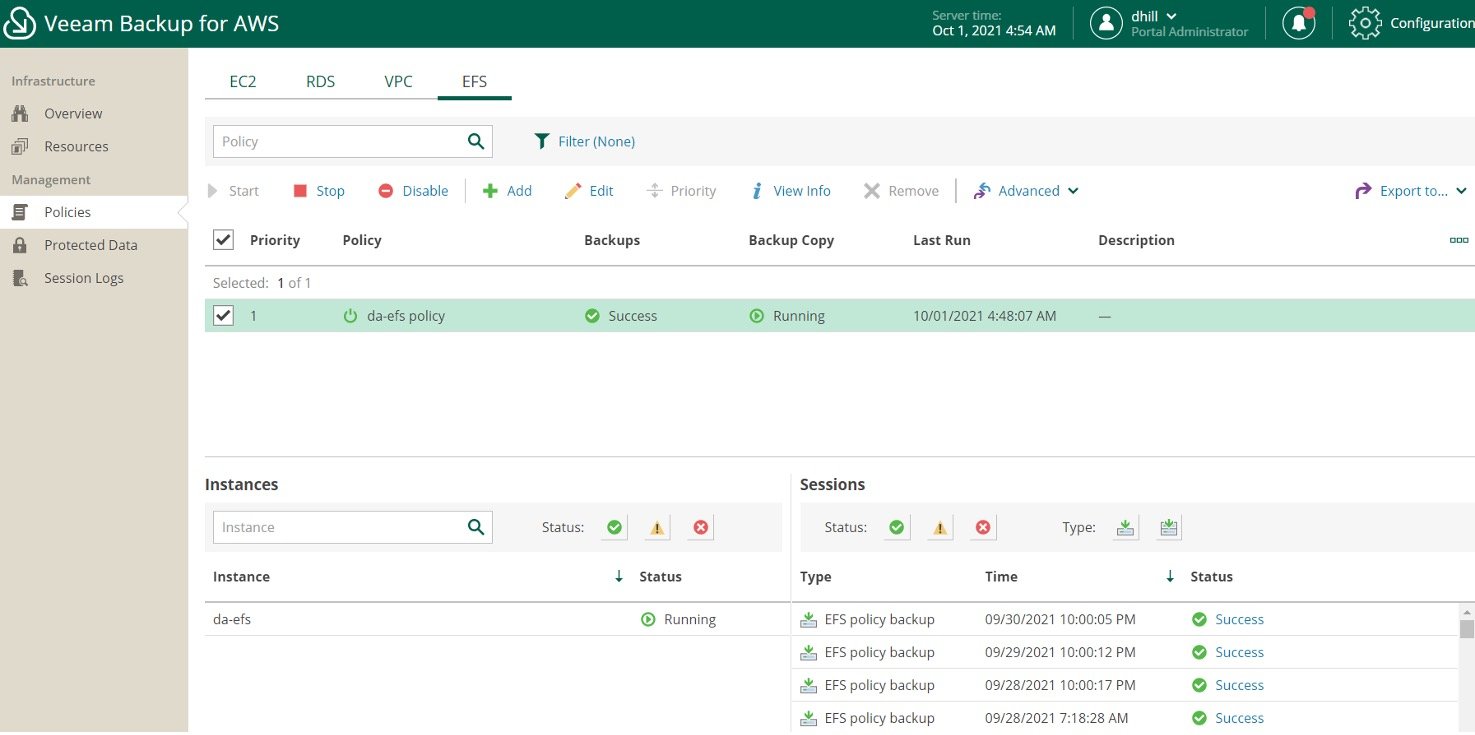
Veeam Backup for AWS is Veeam’s AWS backup and recovery offering, delivered as part of Veeam Data Platform. It creates and manages cloud-native snapshots and image-level backups of AWS resources using policies, and stores backups in Amazon S3 with immutability and encryption.
It is available as backup software deployed in the customer’s own AWS environment, as a SaaS service through Veeam Data Cloud for AWS, or through managed service partners. Some newer capabilities are available only when the backup appliance is managed from Veeam Backup & Replication.
Key features include:
- Policy-based automation: Policies define which AWS accounts and regions to protect, and tag-based selection adds new instances without manual changes. Snapshot schedules can run as often as 60 snapshots per hour.
- Snapshots and image-level backups: Combines point-in-time cloud-native snapshots with full and incremental image-level backups. Temporary worker instances are deployed in AWS accounts only while a backup or restore runs.
- Immutable, air-gapped, encrypted backups: Backups are immutable and logically separated from production, encrypted in transit and at rest, with least-privilege access through role-based access controls.
- Flexible recovery: Restores entire workloads or individual files to the location needed.
- Data lifecycle and cost controls: Moves snapshots to object storage, compresses backup data, and tiers it to lower-cost Amazon S3 storage classes. A built-in calculator estimates costs before a policy is applied.
- AWS service coverage: Protects Amazon EC2, EBS, RDS, Aurora, DynamoDB, EFS, FSx, Redshift and VPC configurations. Amazon S3 buckets are protected as unstructured data through Veeam Backup & Replication.
- Centralized management: Manages protection for AWS alongside other cloud, application and on-premises workloads from one console.
Limitations (as reported by users on PeerSpot):
- Pricing: Licensing is considered expensive compared with alternatives, and some users advise tracking costs closely to avoid unexpected charges.
- Reporting and monitoring: Reporting and monitoring capabilities are described as less polished than other parts of the product.
- User interface: Some users would like the interface to be more user-friendly.
- Licensing model: Licensing is subscription-based, and some users would prefer package or perpetual options.
Source: Veeam
3. N2W Backup & Recovery

Best for: AWS-centric teams needing orchestrated failover and DR drills
Strengths: 60-second backup intervals, scheduled DR drills, cross-cloud recovery
Things to consider: Users cite GUI, stability, and documentation gaps
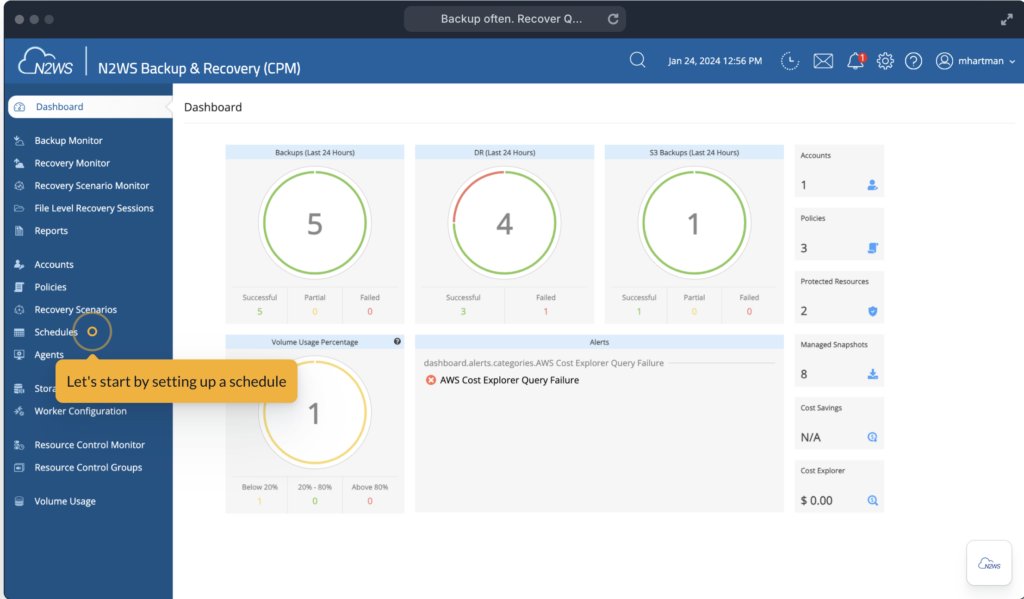
N2W Backup & Recovery is a backup and disaster recovery platform for AWS that also covers Azure and Google Cloud. It builds on AWS snapshot technology and is deployed in the customer’s account as an AMI from AWS Marketplace or through a CloudFormation template.
The platform handles scheduled backups, archiving to lower-cost storage, and orchestrated recovery of multiple resources in a defined order. It can also recover AWS workloads into Azure for cross-cloud disaster recovery.
Key features include:
- Frequent backups and multi-tier retention: Supports a 60-second backup interval. A single policy carries a base schedule plus daily, weekly and monthly tiers, each with its own retention and compliance lock.
- Orchestrated failover and failback: Restores multiple resources in the order they need to come online. Recovery Scenarios run scheduled DR drills and dry runs.
- Network resilience: Captures VPC settings, load balancers, gateways and other network components so environments can be restored to a production state.
- Cross-cloud recovery: Recovers AWS workloads into Azure as bootable VMs, building the root volume and provisioning the VM from a backup held in a storage repository.
- Granular restore: Recovers files and folders across multiple backup generations without pre-indexing.
- Archiving and cost controls: Archives incremental backups to Amazon S3, Glacier, Azure Blob or Wasabi. Resource Control powers down non-critical resources during off-hours, and DR retention can be limited to the generations needed.
- Security and compliance: Supports multi-region AWS KMS keys with key switching, S3 compliance locking, and the AWS European Sovereign Cloud.
- AWS service coverage: Protects EC2, EBS, RDS, Aurora, DynamoDB, DocumentDB, EFS, FSx, S3, S3 Glacier, Redshift, SAP HANA, VPC, AWS Outposts and Amazon EKS.
- Management and integrations: Provides a single dashboard across accounts and clouds, a RESTful API, customizable reports, integrations with Datadog, Splunk and Bocada, and multi-tenancy for MSPs.
Limitations (as reported by users on PeerSpot):
- User interface: The GUI is described as having room for improvement.
- Stability: Some users report that stability could be improved.
- Documentation: Users would like more step-by-step documentation for recovery scenarios.
- Deployment: Deployment is mentioned as an area that could be improved.
Source: N2W
4. Druva

Best for: Organizations wanting SaaS air-gapped AWS backup without infrastructure
Strengths: Agentless SaaS, isolated immutable backups, built-in threat hunting
Things to consider: Users report complex setup and limited reporting customization
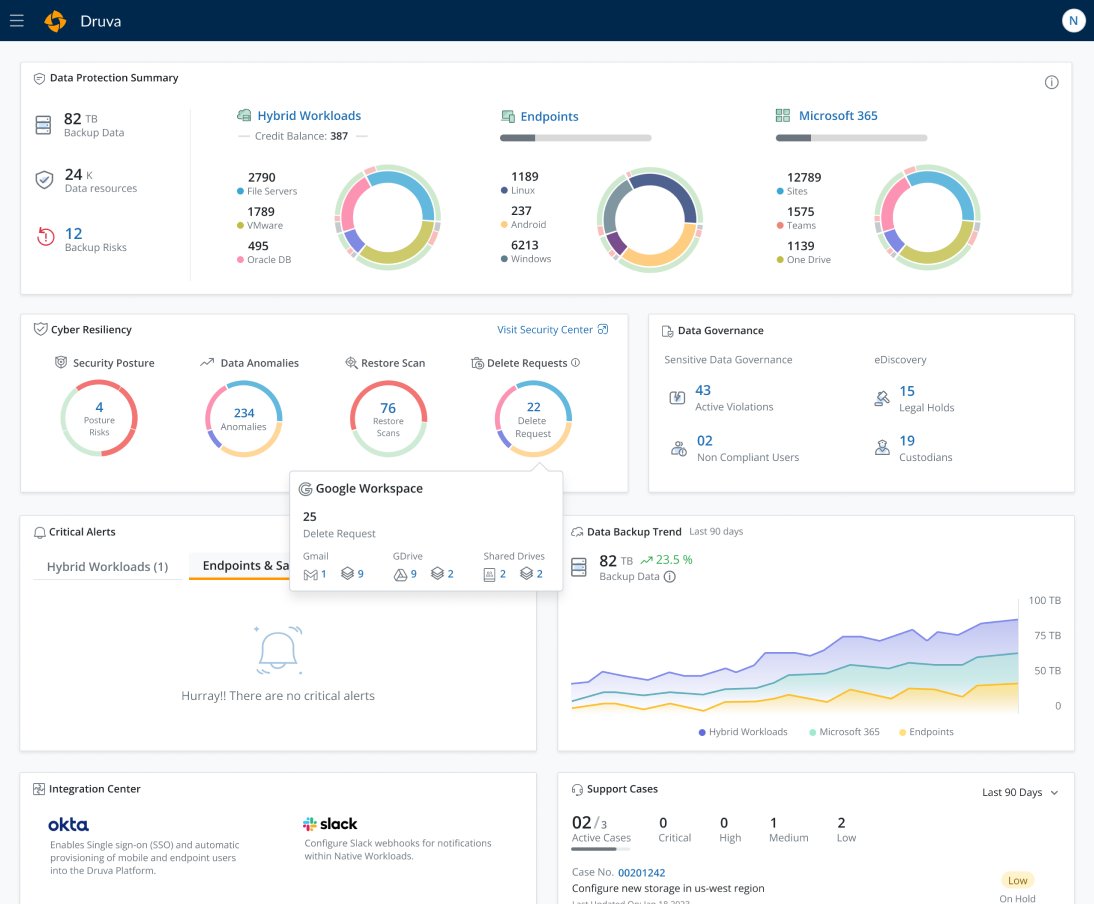
Druva provides AWS backup and cyber resilience as a fully managed SaaS service within its broader data protection platform. It connects to AWS through APIs without agents and stores backups of EC2, RDS, S3 and EFS in a separate security domain outside the customer’s AWS organization.
Backups are immutable and globally deduplicated. The service adds threat scanning of backup data and recovery to the same or alternate AWS accounts and regions.
Key features include:
- Isolated, immutable storage: Keeps backups outside the AWS organization with immutability, so they remain available if the AWS account is compromised. Backups of supported workloads (EC2, EBS and S3) can be stored in Azure.
- AWS workload coverage: Protects Amazon EC2, EBS, RDS, S3 and EFS, with decoupled backups extending to Amazon DocumentDB and Neptune.
- Cross-account and cross-region recovery: Restores to the same or alternate AWS accounts and regions from trusted recovery points.
- Granular restore: Restores individual files, folders, objects, metadata or full workloads, including file-level recovery from EC2 backups without a full VM restore.
- Threat Watch and Threat Hunting: Scans backup data, searches historical backups for indicators of compromise, and shows attack scope and timeline to identify clean recovery points.
- Centralized management: Manages backup policies, visibility and recovery across AWS accounts, regions and workloads from one SaaS control plane, alongside AWS snapshots used for operational recovery.
- Storage efficiency: Uses global source-side deduplication and compressed storage, with no egress fees.
Limitations (as reported by users on AWS Marketplace):
- Initial setup: Some users describe the initial setup as complex.
- Reporting: Reporting could be more customizable for detailed compliance needs.
- User interface: Some users note that the interface needs improvement.
- Data stored in provider’s cloud tenant: Loss of control and governance and limited ability to reduce costs.
Source: Druva
AWS Disaster Recovery Best Practices
Regardless of the solution you choose, here are best practices that will help you make your AWS deployments more resilient.
Store Immutable Backup Copies in an Isolated Account or Outside AWS
Backup copies stored in the same account as production workloads may be vulnerable to compromised credentials, ransomware, accidental deletion, or malicious administrative actions. Even when backups are replicated across AWS Regions, attackers with sufficient account permissions may be able to modify retention settings or delete unprotected recovery points. Separating backup infrastructure from production environments creates an additional security boundary and reduces the likelihood that a single incident will compromise both systems.
Configure AWS Backup to copy recovery points into a dedicated backup account with restricted administrative access. Use AWS Backup Vault Lock in compliance mode to enforce immutable retention policies, or logically air-gapped vaults to add stronger administrative isolation for supported workloads. For additional provider independence, maintain selected recovery copies in another cloud or an on-premises repository. Regularly verify that these isolated backups can be restored without relying on production credentials, networking, or infrastructure.
Enforce Backup Policies Across All Accounts with AWS Organizations and Tags
Large AWS environments often contain multiple accounts, business units, and development teams, making consistent backup coverage difficult to maintain. When backup configurations are managed independently, newly deployed resources may remain unprotected, retention periods may vary, and critical workloads may lack cross-Region recovery copies. Centralized backup governance helps organizations apply consistent protection standards and identify gaps before an incident occurs.
Use AWS Organizations backup policies to define backup schedules, retention requirements, and supported cross-account or cross-Region copy rules across organizational units. Combine these policies with resource tags such as BackupTier, Environment, and Criticality to assign workloads to appropriate backup plans based on business requirements. Enable AWS Backup Audit Manager to monitor supported compliance controls and identify resources that violate backup policies. Regularly review effective policies, resource assignments, and failed backup jobs to ensure that newly provisioned infrastructure receives the intended protection.
Orchestrate Whole-App Recovery
Recovering individual AWS resources does not guarantee that an application will function after a disaster. Applications depend on interconnected compute instances, databases, storage volumes, networking configurations, security policies, and external services. Restoring these components independently can leave critical dependencies unresolved, even when every backup operation succeeds. Infrastructure-as-code templates, resource tags, and manually maintained runbooks introduce dependencies on configurations that may be incomplete or outdated as production environments change.
Prioritize disaster recovery solutions that can automatically discover application components and dependencies, capture the configurations required for recovery, and reconstruct the entire application environment without relying on manually maintained infrastructure-as-code templates, tags, or old runbooks. The recovery process should automatically provision resources, restore data, configure networking and access controls, and bring services online in the correct dependency order.
Run Scheduled Restore Tests and Failover Drills
Successful backup jobs and healthy replication status do not guarantee that applications can be recovered during a disaster. Recovery may fail because of corrupted data, missing permissions, incompatible configurations, unavailable dependencies, or insufficient capacity in the secondary Region. Without regular testing, organizations may discover these issues only after production systems become unavailable.
Configure AWS Backup restore testing plans to periodically validate recovery points for supported resources, and use AWS Elastic Disaster Recovery to conduct non-disruptive recovery drills for replicated servers. Extend these tests beyond individual resources by validating application functionality, database consistency, network connectivity, and user authentication. Measure actual RTO and RPO results against business requirements, and document failures and corrective actions. Schedule additional failover and failback exercises after major infrastructure changes to ensure that recovery procedures remain effective as applications evolve.
Avoid Control Plane Dependencies During Failover
AWS control planes manage operations such as creating EC2 instances, modifying infrastructure configurations, and updating service settings. During a major regional disruption, these administrative APIs may experience degraded availability, making recovery procedures that depend on extensive resource provisioning or configuration changes less reliable. AWS recommends minimizing control plane operations during disaster recovery and favoring data plane mechanisms that continue serving application traffic.
Design recovery architectures with preconfigured routing policies, replicated data, and sufficient standby capacity to reduce the number of administrative actions required during failover. For example, use Amazon Route 53 health-check-based failover or Amazon Application Recovery Controller routing controls instead of depending on manual DNS record updates. Maintain essential infrastructure in the recovery Region and test whether failover can proceed when selected AWS management APIs are unavailable. The goal is to make recovery primarily a traffic-routing and workload-activation process rather than a complex infrastructure deployment.
Conclusion
An effective AWS disaster recovery strategy requires aligning recovery time and point objectives with business priorities. Organizations must select the right combination of multi-AZ, multi-Region, or isolated backup architectures to balance resilience against cost and complexity. Regular failover drills and automated recovery workflows ensure that workloads can be restored smoothly during unexpected disruptions.
About the author